Support 24/7: +48 61 646 07 77

Microsoft 365 – usprawnij swoją organizację!
Odkryj nowy wymiar efektywności, bezpieczeństwa i współpracy z kompleksowym pakietem narzędzi Microsoft 365. Nasz zespół ekspertów przeprowadzi Cię przez cały proces wdrożenia, dostosowując rozwiązania do unikalnych potrzeb Twojej firmy. Od analizy potrzeb, przez konfigurację i szkolenia, aż po wsparcie i administrację po wdrożeniu.
345
+
mln użytkowników Office 365
300
+
mln aktywnych użytkowników Teams
85
%
firm z listy Fortune 100 korzysta z Azure



Na tym etapie dokonujemy oceny potrzeb i wymagań organizacji, a także przeglądamy obecną infrastrukturę IT.
Tworzymy szczegółowy plan wdrożenia i projektujemy konfigurację usług oraz ustawienia bezpieczeństwa.
Przeprowadzamy instalację i konfigurację usług Microsoft 365, a także zajmujemy się migracją danych.
Wspieramy zespół IT oraz pozostałych pracowników w fazie wdrożenia.
Zapewniamy ciągłe wsparcie techniczne i konsultacje, monitorując i optymalizując usługi dla zapewnienia ich efektywności.

Podstawowe wdrożenie dla małych firm, obejmujące do 10 kont. Zapewniamy szybkie uruchomienie usługi oraz podstawową konfigurację niezbędną do pracy w środowisku M365.
Dedykowany jest dla małych i średnich firm, obejmując kompleksowe wdrożenie. Konfiguracja zapewnia bezpieczne środowisko pracy wraz z opracowanymi politykami dostępu i usługami M365.
Pakiet ten zapewnia kompleksową obsługę dla dużych organizacji, w tym konfigurację Intune, SSO, oraz pełne wsparcie techniczne na każdym etapie wdrożenia oraz utrzymanie po wdrożeniu.
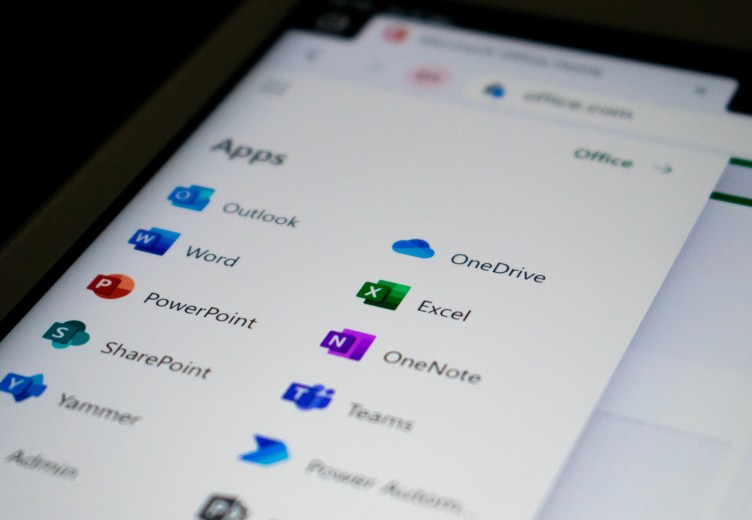
Microsoft 365 zapewnia dostęp do pełnego pakietu aplikacji Office, oferując zaawansowane narzędzia niezbędne w codziennej pracy biurowej. Z Wordem, Excel, PowerPoint i wieloma innymi aplikacjami, Twoja organizacja zyska na produktywności, niezależnie od branży. Te aplikacje nie tylko ułatwiają tworzenie i edytowanie dokumentów, ale także wspierają współpracę i dzielenie się informacjami w czasie rzeczywistym. Dzięki integracji z chmurą, dostęp do dokumentów jest możliwy z każdego miejsca, co jest kluczowe w środowisku pracy zdalnej i hybrydowej.
Microsoft 365 rewolucjonizuje sposób, w jaki zespoły komunikują się i współpracują. Kluczowym elementem jest tutaj Microsoft Teams – platforma, która umożliwia nie tylko czatowanie i prowadzenie wideokonferencji, ale także współdzielenie plików i zarządzanie projektami w jednym miejscu. Dzięki integracji z innymi aplikacjami Microsoft 365, takimi jak SharePoint czy OneNote – Teams staje się centrum współpracy, gdzie zespoły mogą efektywnie pracować nad wspólnymi projektami, niezależnie od swojej lokalizacji. To narzędzie idealne dla każdej organizacji, która ceni sobie efektywność, szybkość i elastyczność w komunikacji.
Dodatkowo, SharePoint w pakiecie Microsoft 365 rozszerza możliwości współpracy, oferując platformę do zarządzania treścią i dokumentami. Umożliwia tworzenie witryn intranetowych, centralizowanie zasobów i informacji, a także ułatwia współdzielenie i zarządzanie dokumentami w całej organizacji, co znacznie usprawnia przepływ pracy i dostęp do ważnych danych.


Microsoft 365 to idealne rozwiązanie dla środowisk pracy zdalnej i mobilnej, dzięki swoim technicznym aspektom, które wspierają elastyczność i dostępność. Aplikacje takie jak Office 365 są dostępne zarówno w wersjach online, jak i desktopowych, co umożliwia pracę z dowolnego miejsca. OneDrive dla Firm zapewnia bezpieczne przechowywanie i udostępnianie plików w chmurze, co jest kluczowe przy pracy zespołowej na odległość. Dodatkowo, zabezpieczenia oparte na chmurze i zarządzanie urządzeniami mobilnymi z Intune pozwalają na bezpieczne korzystanie z zasobów firmowych na różnych urządzeniach.
Microsoft 365 oferuje potężne narzędzia, takie jak Microsoft Planner i To Do, które ułatwiają zarządzanie projektami i zadaniami w Twojej organizacji. Planner pozwala na tworzenie planów, przypisywanie zadań, ustalanie terminów i współdzielenie postępów z całym zespołem, co czyni go idealnym narzędziem do koordynacji wielu projektów. Z kolei Microsoft To Do to osobisty asystent zadań, który pomaga w organizacji codziennych obowiązków, umożliwiając efektywną pracę i lepszą organizację czasu.


Microsoft 365 w połączeniu z Azure oferuje kompleksowe rozwiązania w zakresie zarządzania infrastrukturą i migracji usług do chmury. Korzystając z Azure, organizacje mogą łatwiej zarządzać swoją infrastrukturą IT, w tym zasobami sieciowymi i serwerowymi. Integracja z narzędziami takimi jak Azure Active Directory i Microsoft Intune zapewnia bardziej zaawansowane zarządzanie tożsamościami i urządzeniami, umożliwiając bezpieczne i efektywne zarządzanie zasobami cyfrowymi firmy.
Łącząc wszystkie usługi w jedną całość z łatwością stworzysz dobrze poukładany ekosystem pracy. Więcej przeczytasz na podstronach dotyczących zarządzania i administracją infrastrukturą IT dla usług Microsoft.
Dzięki elastycznym opcjom konfiguracji, integracji z Azure i ciągłemu wsparciu technicznemu, Microsoft 365 to inwestycja w przyszłość Twojej organizacji, zapewniająca dostęp do najnowszych technologii i umożliwiająca skalowanie w miarę rozwoju firmy.

Efektywna praca

Bezpieczeństwo danych

Elastyczność

Skalowanie organizacji

Koordynacja

Stałe wsparcie
Wybór pakietu M365 dla organizacji to zawsze dobry wybór niezależnie od profilu usług, które świadczysz. Narzędzia oraz ich możliwości sprawdzą się w każdym segmencie organizacji, niezależnie od trybu pracy, miejsca czy liczby zatrudnionych osób.






Centuria to proaktywny partner biznesowy, który nie czeka na nasz ruch, a samodzielnie szuka potrzebnych rozwiązań lub ulepszeń, które możemy wspólnie wdrożyć. Razem od lat pracujemy na sukces jednej z największych instancji Magento w Polsce. Szczerość we współpracy i profesjonalne doradztwo, z którego chętnie korzystamy od lat są dla nas bezcenne. Z czystym sumieniem możemy polecić Centurię jako eksperta w dziedzinie infrastruktury.

Snowdog

Nasza wieloletnia współpraca z Centurią opiera się na dużym zaufaniu i partnerskim podejściu do projektów, ale też koleżeńskiej atmosferze w ramach zespołów projektowych. Elastyczność, dobra komunikacja i nasze poczucie bezpieczeństwa wynikające ze wsparcia zespołu ekspertów bardzo dobrze znających się na Magento sprawiają, że jesteśmy gotowi polecać Centurię innym. Czujemy, że zawsze możemy na nich polegać.

Strix
Chcemy dowozić wysoką wartość naszym Klientom. Kluczem od zapewnienia bezpiecznego i sprawnego działania sklepów Magento są odpowiednie rozwiązania serwerowe. Potrzebowaliśmy w tym obszarze partnera proaktywnego, który sam poszukuje najlepszych możliwych rozwiązań i jest bardzo proaktywny. Takim partnerem jest dla nas Centuria, z którą współpracujemy już od około 2 lat. Bardzo podoba nam się to, jak usprawniają i porządkują każdy projekt, nad którym zaczynają pracować. Centuria to partner, któremu ufamy i możemy polecić jako eksperta rozwiązać serwerowych dla Magento.

Growcode sp. z o.o.
Z Centurią współpracujemy od wielu lat, ceniąc sobie dużą wiedzę, doświadczenie i elastyczność zespołu. Firma wyróżnia się niezwykle profesjonalnym podejściem do supportu i wysoką responsywnością na wrzucane przez nas tickety. Jest świetnym doradcą w zakresie zarządzania infrastrukturą IT. Rzetelny partner biznesowy przy wdrożeniach dużych projektów.

Advox Studio
Bardzo cenimy współpracę z Centurią za proaktywne podejście, wiedzę ekspercką i zaangażowanie na każdym etapie projektu. Zespół Centurii niejednokrotnie pomógł nam w wyborze rozwiązań serwerowych dla naszych klientów, a dzięki ich doświadczeniu i profesjonalnemu wsparciu otrzymaliśmy rozwiązania dostosowane do konkretnych potrzeb biznesowych. Polecamy Centurię każdemu, kto potrzebuje solidnego i kompetentnego partnera w obszarze infrastruktury IT.

Spyrosoft Ecommerce S.A.
W naszej ocenie Centurię wyróżnia przede wszystkim działanie w interesie firmy klienta. Współpracując z nimi można liczyć na spersonalizowane i indywidualne podejście nawet do najtrudniejszych przypadków. Czujemy, że proponowane rozwiązania są „szyte na miarę” naszych potrzeb, poprzez zaangażowanie naszej agencji w proces ich tworzenia, oparty na wspólnych dyskusjach nad możliwymi rozwiązaniami.

Lizard Media
Współpracę z Centurią cenię przede wszystkim za profesjonalizm i specjalistyczną wiedzę związaną z Magento. Jest to nieocenioną wartością w sytuacjach krytycznych. Wsparcie 24/7 daje duży spokój zarówno nam, jak i naszym klientom. Zdecydowanie polecam Centurię wszystkim, którzy traktują biznes poważnie i liczą na profesjonalnego, stabilnego partnera w rozwoju swojego biznesu.

Panda Group
Razem z Centurią rozwijamy jedną z największych platform sprzedażowych bazujących na Magento w Polsce. Profesjonalizm oraz wysokie zaangażowanie bezpośrednio przekłada się na efekty. Centuria to specjaliści w dziedzinie administracji oraz zarządzania infrastrukturą o bardzo złożonej konstrukcji i mnogiej ilości powiązań pomiędzy systemami. Ciągłość oraz dostępność ww. systemu od początku współpracy jest utrzymana w sposób spełniający nasze wymagania, a zlecenia są realizowane z najwyższą starannością.

Castorama
Z racji specyfiki naszego projektu gear.cdprojektred.com potrzebowaliśmy solidnego partnera dobrze zaznajomionego z nowoczesnymi technologiami, który szybko i sprawnie wdroży infrastrukturę dla naszej aplikacji. Centuria wzorowo poradziła sobie z zadaniem oraz dodatkowo zapewniła stabilność sprzedaży podczas dużych akcji promocyjnych, które przeprowadzaliśmy.

CD PROJEKT RED STORE
The team never left us wondering if things were getting done. We instead had full confidence that this knowledgable team knew what to do and that they'd get it done. I write this review because changes within our organization moved us in a different direction and we now no longer work with Centuria. To show my appreciation for their attentiveness and effectiveness

mTab





Czy Microsoft 365 umożliwia integrację z istniejącymi systemami lokalnymi?

Tak, Microsoft 365 oferuje opcje integracji z istniejącymi systemami i aplikacjami lokalnymi, w tym z serwerami SharePoint i systemami ERP.
Jakie są opcje zarządzania urządzeniami mobilnymi w Microsoft 365?
Microsoft 365 oferuje zaawansowane zarządzanie urządzeniami mobilnymi za pomocą Microsoft Intune, umożliwiając zdalną kontrolę, zabezpieczenia i konfigurację urządzeń. Więcej przeczytasz na stronie o zarządzaniu infrastrukturą.
Czy Microsoft 365 wspiera uwierzytelnianie wieloskładnikowe (MFA)?
Tak, Microsoft 365 wspiera MFA, zapewniając dodatkową warstwę bezpieczeństwa poprzez wymaganie dodatkowego potwierdzenia przy logowaniu.
Jakie są opcje backupu danych w Microsoft 365?
Microsoft 365 oferuje zintegrowane opcje backupu, ale dla bardziej kompleksowych potrzeb zaleca się korzystanie z dedykowanych rozwiązań do backupu i odzyskiwania danych. Warto zerknąć na nasz artykuł blogowy poruszający ten temat: Azure Site Recovery vs. Azure Backup
Czy Microsoft 365 umożliwia zarządzanie zgodnością i przestrzeganiem przepisów?
Tak, Microsoft 365 oferuje narzędzia do zarządzania zgodnością, umożliwiające monitorowanie i przestrzeganie różnych przepisów, w tym GDPR. Jako Centuria stawiamy nacisk na bezpieczeństwo i poprawność wdrożeń zgodnie z wymogami prawnymi bądź wewnętrznymi procedurami.
Jakie są możliwości personalizacji środowiska pracy w Microsoft 365?
Microsoft 365 umożliwia personalizację środowiska pracy, w tym dostosowywanie pulpitów nawigacyjnych, ustawień aplikacji i doświadczeń użytkownika zgodnie z indywidualnymi potrzebami.